
Getting Started
Install
The Download page has installers and archives for macOS, Windows, and Linux.
Or build from source with Rust 1.95 or newer:
git clone https://github.com/crmne/spotifast
cd spotifast
cargo install --path .
On Linux, install the GUI and audio development packages. On Arch:
sudo pacman -S --needed alsa-lib libpulse libxkbcommon wayland
On Debian or Ubuntu:
sudo apt install libasound2-dev libpulse-dev libxkbcommon-dev libwayland-dev libgl1-mesa-dev
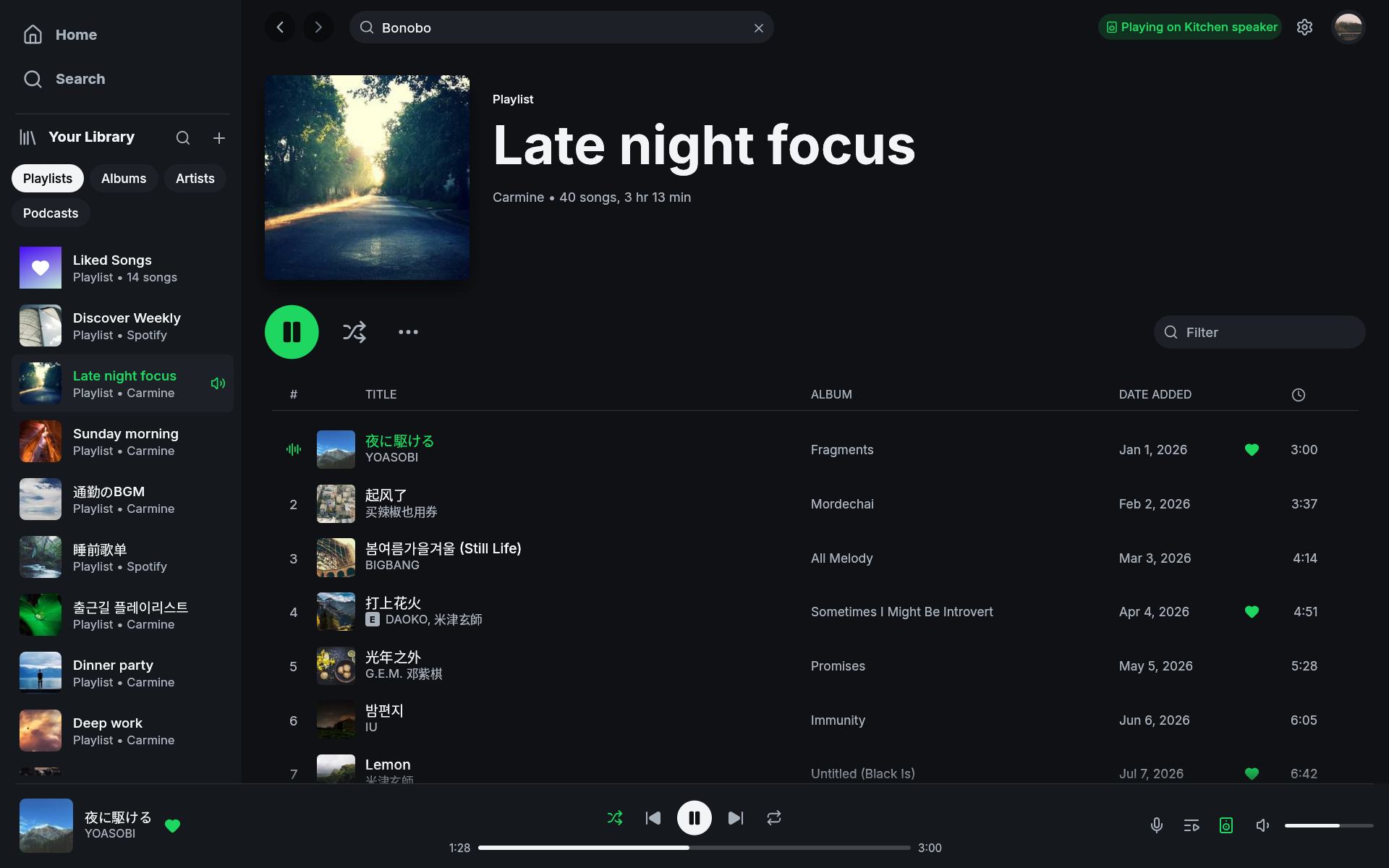
On main, after 0.7.1, letters from system fallback fonts share the Latin
baseline. This keeps mixed Japanese and Latin titles aligned when macOS
selects Hiragino Sans, including when Japanese is a preferred language.
Spotifast uses system fonts for scripts that its interface font does not
cover, including Chinese, Japanese, Korean, Arabic, Hebrew, Thai, and Indic
scripts. macOS and Windows include fonts for the common cases. On Linux,
install noto-fonts and noto-fonts-cjk (Arch) or fonts-noto and
fonts-noto-cjk (Debian or Ubuntu) if titles appear as empty boxes.
On main, after 0.7.1, long right-to-left titles in song rows and the player
bar end with an ellipsis inside their text area. Joined Arabic letters are
measured together so the last visible letter stays whole at the edge.
A desktop entry ships in packaging/applications/fastpotify.desktop. It
registers Spotifast for spotify: links; with another Spotify client
installed, xdg-mime default fastpotify.desktop x-scheme-handler/spotify
picks Spotifast.
Sign in
Start the app and press Sign in with Spotify. Your browser opens Spotify’s consent page, so Spotifast never sees your password. When the browser returns to the app, your library loads.
Spotifast stores a refresh token in your platform’s state directory
(~/.local/state/fastpotify on Linux). You normally need the browser only
once per machine.
Enable playback on this computer
Playing music on this machine needs a second browser approval because Spotify authorizes streaming separately (why). Open the device menu in the player bar and select Set up playback here, or use Settings. This needs Spotify Premium. Spotifast saves the playback credential.
The computer then appears as a Spotify Connect device named Spotifast. You can rename it in Settings.
Basics
- Closing the window does not stop the music. Spotifast keeps playing from the system tray; reopen it from the tray icon and quit from the tray menu or Ctrl+Q. On macOS you can also reopen it from the Dock. Settings can turn this off. On Linux, including Flatpak, a desktop with a working system tray is required for this behavior.
- Play and Pause fade. With the default audio backend, music played on this computer fades in or out to avoid a hard cut. Gapless transitions between songs and playback on another device are unchanged.
- Play buttons show progress. The button spins until Spotify responds.
- Artist names are links. Click a credited artist in the player bar to
open their page. On
main, for the release after 0.7.1, local playback preserves these links before Web API metadata arrives. - Common actions have shortcuts. Space plays and pauses, Ctrl+F or
/searches, andQopens the queue. Ctrl+/ shows the full list. - Rows and cards have context menus. Right-click a song, playlist, album,
or artist to see actions such as queue, save, add to playlist, and copy link.
Search’s Top result card has the menu for the song, artist, album,
playlist, or podcast it shows. Search shelves and filtered grids, and Home’s
playlist shortcuts, Made for you, Recently played, and top artist cards offer
the same menus. Your own playlists include Edit details and Delete.
On
main, for the release after 0.7.1, Library’s album, artist, and podcast grids and artist pages’ discography and related-artist cards offer these menus too. Right-clicking opens the menu without starting playback. Add to playlist includes a local name filter for the playlists you can edit, for either one song or a selection. New playlist stays available when no names match. If the playlist already contains the song, Spotifast asks before adding another copy. - Spotify links open in Spotifast. A
spotify:link shared from another app opens its page, starting Spotifast if it is not running. Links toopen.spotify.comgo through the browser first, which hands them over the same way.spotifast <link>does the same from a terminal.