
What is Spotifast?
Why Spotifast
Spotify, native and fast. Spotifast is a lightweight Spotify app for Linux, macOS, and Windows. It opens in well under a second and typically uses 100–250 MB of memory, while Spotify’s desktop app often uses 600 MB to over 1 GB.
Your Spotify playlists stay on your account.
Playback needs Spotify Premium. Free accounts can browse and search, but cannot play music through Spotifast on this computer or another device.
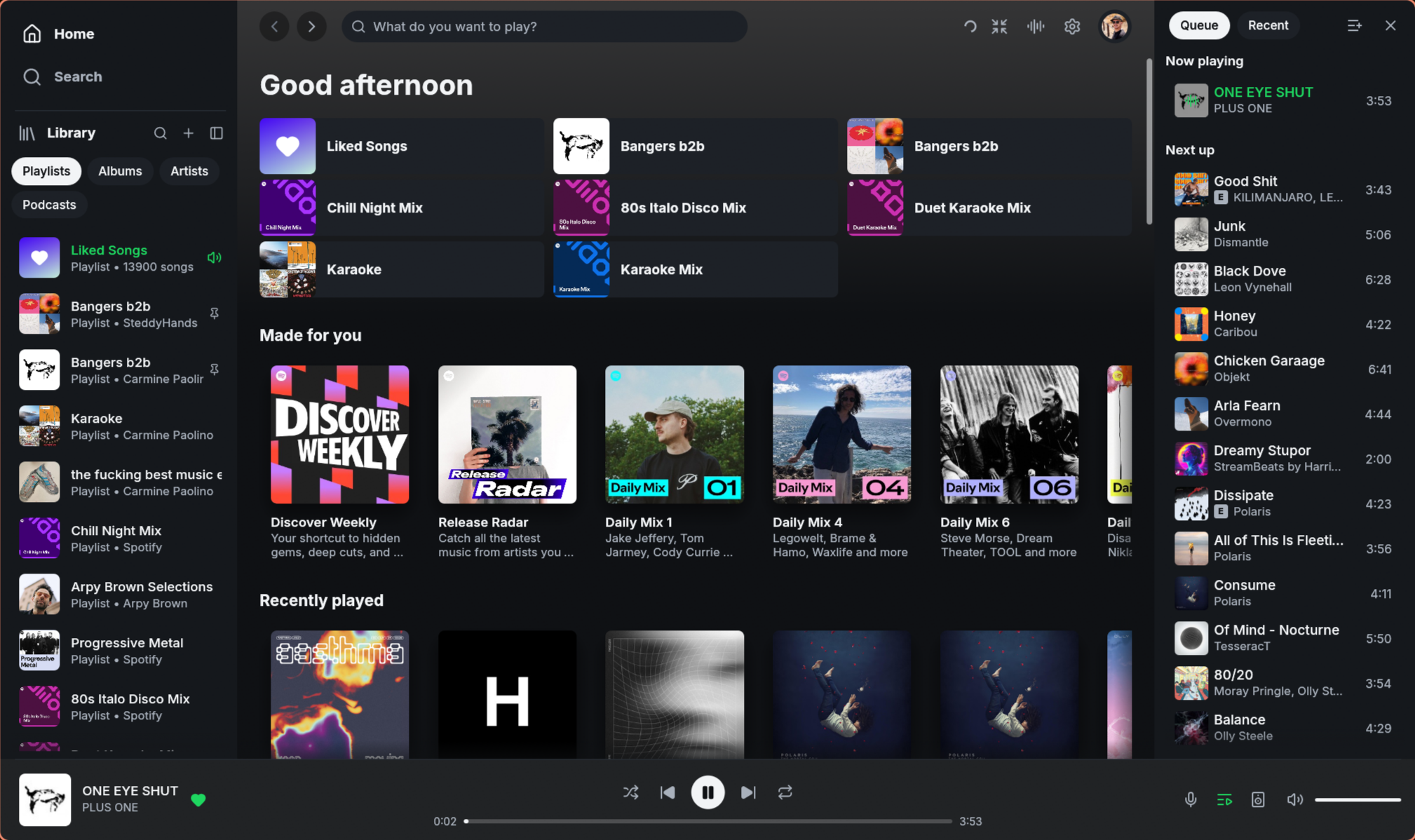
What it does
- Plays music on this computer. Spotifast appears as a Spotify Connect device. Select it from your phone or play music in the app. Playback has no added gaps between songs and supports up to 320 kbps. Optional settings keep songs at a similar loudness and reduce repeat downloads by keeping recently played audio.
- Controls other devices. Move playback to a speaker, a phone, or another computer from the device picker, and keep controlling it: play, pause, skip, seek, shuffle, repeat, volume. The picker expands upward to show several devices at once, fitting the window; longer lists scroll.
- Library. Browse playlists, Liked Songs, saved albums, followed artists, podcasts, and saved episodes. Create, edit, and reorder your playlists.
- Search across songs, artists, albums, playlists, podcasts, and episodes, with artist pages, discographies, and related artists. When Spotify provides an artist profile, select its name on a song, including the top result, to open that page.
- Background playback. Closing the window keeps the music playing from the system tray. Use your keyboard’s media keys to play, pause, and skip.
- Themes. Choose light, dark, or your own colours. On Omarchy, Spotifast can follow your desktop theme automatically. Pages can also take a colour from album art.
Will my Spotify account get banned?
We’re not aware of any confirmed account bans caused by normal Premium listening through Spotifast or other players using the same playback software, librespot.
Spotifast plays music using your Spotify Premium subscription. It does not unlock Premium for Free accounts, remove ads, export songs, or bypass Spotify’s copy protection. You sign in on Spotify’s own website, and Spotifast never receives your Spotify password.
Spotifast is independent of Spotify, so we cannot guarantee Spotify’s future decisions. Changes at Spotify can also temporarily interrupt playback until the app is updated.
What it does not do
Spotifast has a limited scope:
- Playing needs Spotify Premium, both on this computer and when controlling another device. Free accounts can browse and search.
- Built-in playback setup asks for two Spotify approvals: one to access your library, another to play music on this computer. How it connects explains why.
- The built-in player supports up to 320 kbps. librespot cannot play
Spotify Lossless. Source builds from
mainalso offer the optional Soloist player, which uses Spotify’s own implementation with lossless support. This is not included in v0.14.2. Soloist does not report the delivered audio format or supply audio to Spotifast’s EQ and visualisers. - No video podcasts or social features.
- Spotifast is an unofficial app. Changes at Spotify can temporarily break features until Spotifast is updated.
Bug reports should include spotifast.log, panic.log after a crash, and
steps to reproduce the problem. See the
issue form.
Development builds after 0.8.0 also record the app version, operating system,
and graphics details in the log. If the window fails to open, the log can
help explain why, even when you started the app from your desktop.
Prior art
Spotifast is written in Rust, with egui and fastframe for its interface and librespot for Spotify playback. fastframe is the shared foundation of a family of native apps, including Spotifast’s sibling ZapFast, a native client for WhatsApp. Spotifast takes inspiration from spotify-tui, spotify-player, ncspot, and Omarchy Spotify.
Spotifast is an independent project, not affiliated with or endorsed by Spotify AB. Spotify is a trademark of Spotify AB.